Industries · Real estate
Zoho for Real Estate
Capture every portal and WhatsApp lead, match clients to listings, track viewings, offers and transfers, and never miss a tenancy renewal, with follow-ups running automatically in Zoho CRM.
- Zoho Authorized Partner
- Local team in Dubai, UAE
- Free, no-commitment consultation

Built for real estate agencies
- Property Finder, Bayut, Dubizzle and website leads
- Listings matched and sent on WhatsApp
- Viewings, offers and MOUs tracked
- Commission invoicing in Zoho Books
- Tenancy renewal reminders
Implemented by GNet, a Zoho Authorized Partner in Dubai.
Challenges
Where real estate teams lose time and revenue
The problems we see most often before Zoho CRM is in place.

- Portal leads from Property Finder, Bayut and Dubizzle land in different inboxes, and some are never called
- Agents keep clients in their own phones, so the company loses them when an agent leaves
- No record of which listings were sent, viewed or rejected by each client
- Follow-ups after viewings depend on each agent remembering
- No clear view of the commission pipeline or which portal brings real deals
- Tenancy renewals and resale opportunities are missed
The workflow
How real estate companies run on Zoho CRM
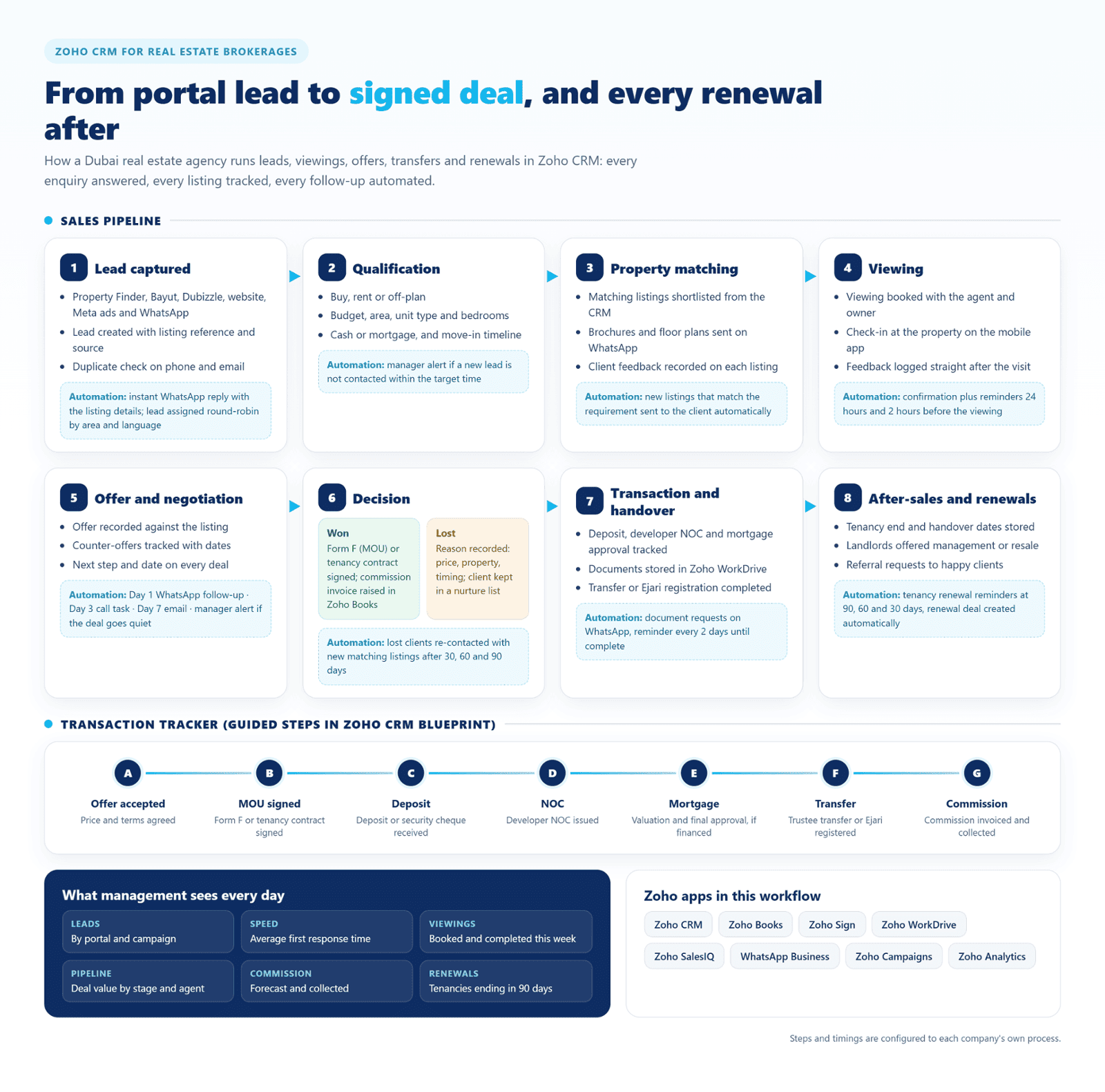
The complete journey with the automations GNet configures at every stage. Click the image to enlarge it.
Sales pipeline
Eight stages, each with its own automation
Every stage has a clear owner, a next step and an automation that keeps the deal moving.
1. Lead captured
- Property Finder, Bayut, Dubizzle, website, Meta ads and WhatsApp
- Lead created with listing reference and source
- Duplicate check on phone and email
Automation: Instant WhatsApp reply with the listing details; lead assigned round-robin by area and language.
2. Qualification
- Buy, rent or off-plan
- Budget, area, unit type and bedrooms
- Cash or mortgage, and move-in timeline
Automation: Manager alert if a new lead is not contacted within the target time.
3. Property matching
- Matching listings shortlisted from the CRM
- Brochures and floor plans sent on WhatsApp
- Client feedback recorded on each listing
Automation: New listings that match the requirement sent to the client automatically.
4. Viewing
- Viewing booked with the agent and owner
- Check-in at the property on the mobile app
- Feedback logged straight after the visit
Automation: Confirmation plus reminders 24 hours and 2 hours before the viewing.
5. Offer and negotiation
- Offer recorded against the listing
- Counter-offers tracked with dates
- Next step and date on every deal
Automation: Day 1 WhatsApp follow-up · Day 3 call task · Day 7 email · manager alert if the deal goes quiet.
6. Decision
Won: Form F (MOU) or tenancy contract signed; commission invoice raised in Zoho Books
Lost: Reason recorded: price, property, timing; client kept in a nurture list
Automation: Lost clients re-contacted with new matching listings after 30, 60 and 90 days.
7. Transaction and handover
- Deposit, developer NOC and mortgage approval tracked
- Documents stored in Zoho WorkDrive
- Transfer or Ejari registration completed
Automation: Document requests on WhatsApp, reminder every 2 days until complete.
8. After-sales and renewals
- Tenancy end and handover dates stored
- Landlords offered management or resale
- Referral requests to happy clients
Automation: Tenancy renewal reminders at 90, 60 and 30 days, renewal deal created automatically.
Tracker
Transaction tracker in one view
A guided Blueprint in Zoho CRM takes the team through each step after the sale, so nobody needs to ask where a file stands.

- Offer accepted: Price and terms agreed
- MOU signed: Form F or tenancy contract signed
- Deposit: Deposit or security cheque received
- NOC: Developer NOC issued
- Mortgage: Valuation and final approval, if financed
- Transfer: Trustee transfer or Ejari registered
- Commission: Commission invoiced and collected
Dashboard
What management sees every day
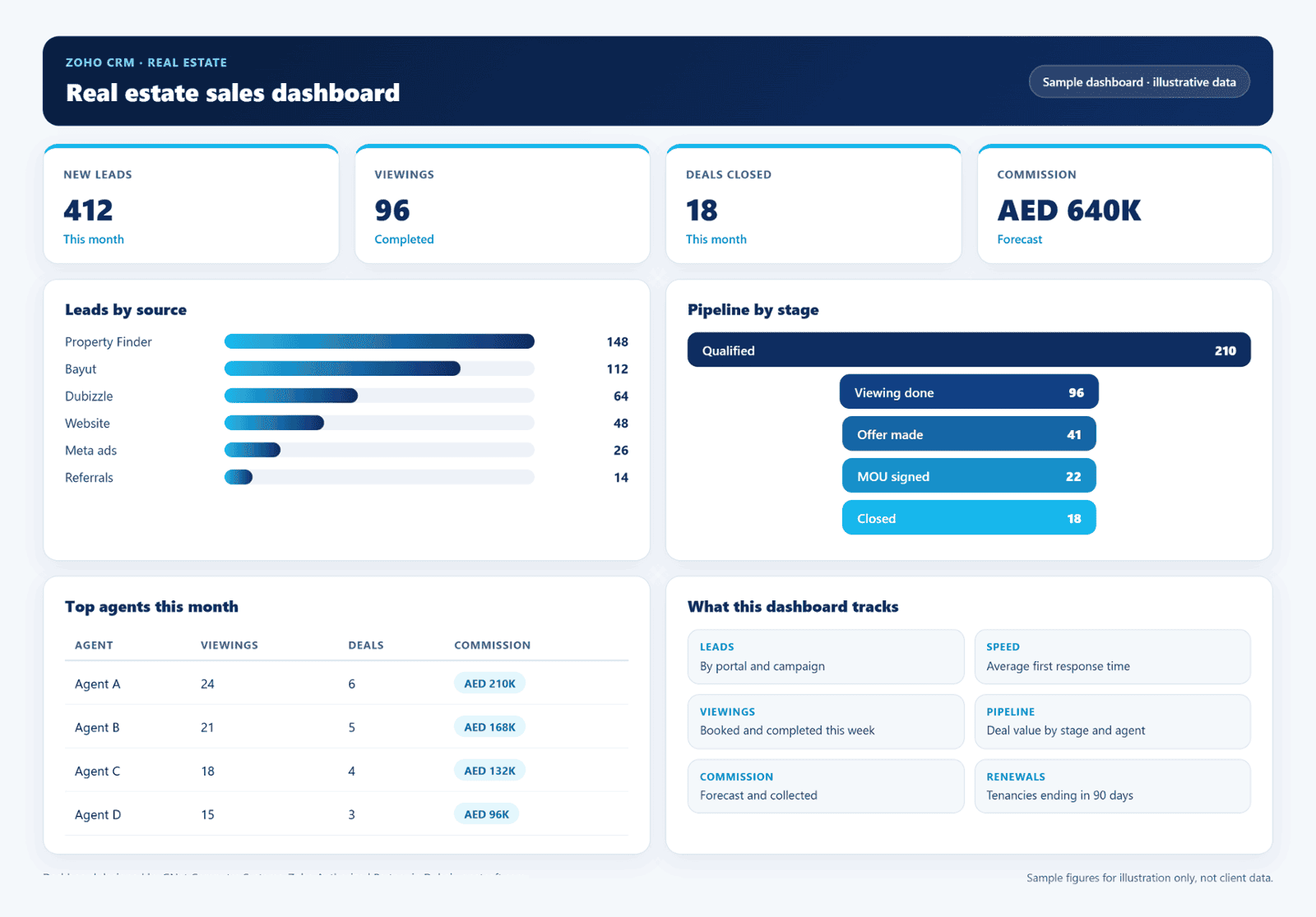
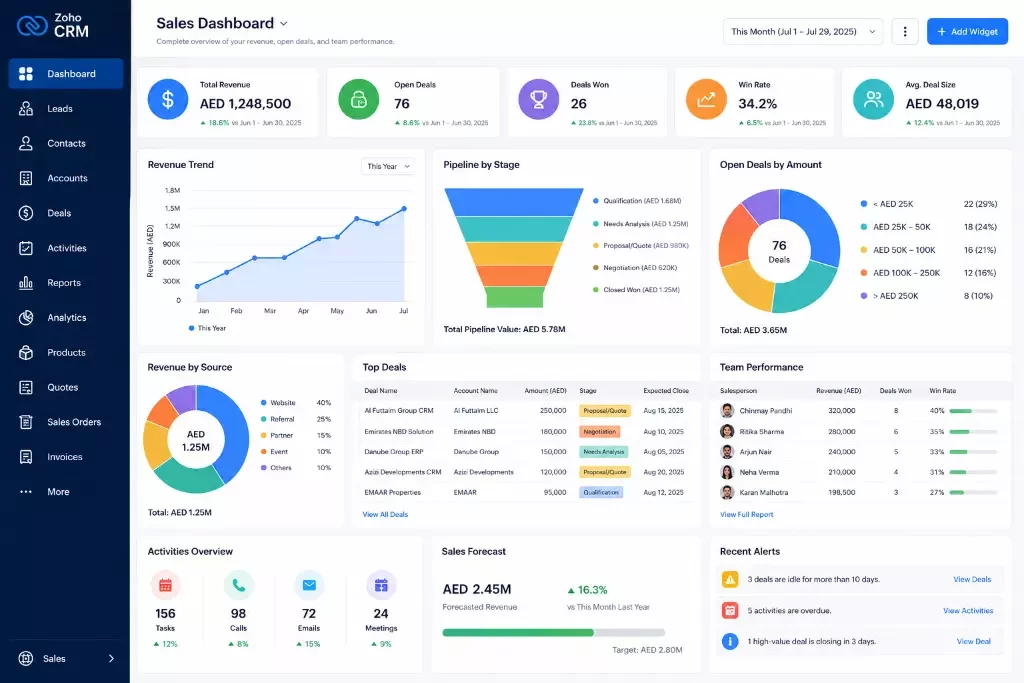
An example of the live Zoho CRM dashboard GNet builds for real estate teams. Figures shown are sample data.
Leads
By portal and campaign.
Speed
Average first response time.
Viewings
Booked and completed this week.
Pipeline
Deal value by stage and agent.
Commission
Forecast and collected.
Renewals
Tenancies ending in 90 days.
Zoho apps in this solution





- WAWhatsApp Business


Why GNet
A Zoho partner for real estate
GNet designs Zoho CRM around how your sales, operations and management teams actually work, then supports you locally in Dubai after go-live.

- Lead capture from property portals, your website and social ads
- WhatsApp Business connected to Zoho CRM
- Listings, viewings and offers tracked in one place
- Commission invoicing set up in Zoho Books
- Data migration from Excel or your current CRM
- Training for agents, team leaders and management
Zoho One
One platform for your whole real estate business
One connected system for sales, finance, HR and operations, with one login.
- Zoho CRM for leads, listings, viewings and deals
- Zoho Books for invoicing, payments and UAE VAT
- Zoho People and Zoho Payroll for HR and WPS
FAQ
Zoho for real estate: frequently asked questions
Does Zoho have a CRM built for real estate?
Yes. Zoho for Real Estate is built on Zoho CRM for agents, brokers and realtors, with lead management, property listings, site visit management, deal management and document management. GNet sets it up for UAE agencies and connects Zoho Forms, Zoho Analytics, Zoho Books and WhatsApp.
Can Zoho CRM capture leads from Property Finder and Bayut?
Yes. Portal leads can be brought into Zoho CRM automatically, tagged with the portal and listing reference, and assigned to an agent within minutes.
Can agents use Zoho CRM on their phones?
Yes. Agents use the Zoho CRM mobile app to call and WhatsApp clients, check in at viewings, log feedback and update deals from the field.
Does Zoho CRM track listings as well as clients?
Yes. GNet sets up a listings module with permit, location, unit type and price, and links each listing to the clients it was sent to, viewed by and offered on.
How are commissions handled?
Won deals raise the commission invoice in Zoho Books, and dashboards show commission forecast and collections by agent.
Can you migrate our data from Excel or another CRM?
Yes. GNet migrates clients, listings, deals and tenancy dates, and trains your agents before go-live.
Free consultation
See this workflow running on your own process
Book a free session with a GNet Zoho consultant. We will map your process and show you how it works in Zoho CRM.